Blog

  • 7 Hard Drive Disposal Errors to Avoid for Data Security

    You must avoid common hard drive disposal errors that leave your organization exposed to data breaches. This guide identifies seven frequent mistakes-from inadequate wiping to improper recycling-and gives clear, actionable steps you can take to ensure your drives are destroyed or sanitized securely, protecting sensitive information and minimizing legal and financial risks.

    Types of Hard Drive Disposal Methods

    Physical destructionCrushing or shearing to render platters unreadable; industry services provide Certificates of Destruction and chain-of-custody.
    Shredding (media shredders)Industrial shredders reduce drives to small fragments; suitable for bulk disposal and often required by compliance programs.
    DegaussingMagnetic field erasure for HDDs; commercial degaussers typically generate 1-2 tesla fields to remove magnetic data.
    Data wiping (software)Overwrites or cryptographic erase per NIST SP 800-88; use certified tools for validation and audit trails.
    Cryptographic erase / Secure resaleEncrypt-then-delete keys for immediate purge on encrypted drives; combine with secure wiping before reuse or resale.
    • Physical destruction (crushing, shearing) – best when you need absolute irrecoverability.
    • Industrial shredding – efficient for high-volume destruction across departments.
    • Degaussing – effective for magnetic HDDs but not for most SSDs or encrypted media.
    • Software wiping – overwrite methods or ATA Secure Erase, suitable when drives must be reused.
    • Cryptographic erase – instant purge by destroying encryption keys, ideal for encrypted fleets.

    Physical Destruction

    You should opt for professional crushing or shearing when drives contain high-value or regulated data; services like Shred-it perform mechanical destruction that leaves platters fragmented and provides a Certificate of Destruction and chain-of-custody, meeting many audit requirements and eliminating forensic recovery risk.

    Data Wiping

    You can use certified wiping tools to overwrite HDDs or invoke ATA Secure Erase on many SSDs; follow NIST SP 800-88 guidance, choose a validated product (for example, enterprise solutions that log actions), and retain reports for compliance with regulations such as HIPAA or PCI DSS.

    For more detail, when you handle HDDs, a single verified overwrite often suffices under current NIST guidelines, while legacy DoD multi-pass patterns are largely unnecessary for modern drives; with SSDs, prefer cryptographic erase or ATA Secure Erase because wear-leveling prevents reliable full overwrites, and enterprise tools like Blancco provide tamper-evident reports and automated verification to support audits and chain-of-custody.

    After you complete destruction or wiping, retain certificates, verification logs, and chain-of-custody records to prove compliance and support incident response.

    Tips for Secure Hard Drive Disposal

    Before disposing, take concrete steps to limit exposure:

    • Encrypt drives with AES-256 or perform cryptographic erase on SSDs;
    • Follow NIST SP 800-88 (clear, purge, destroy); note that degaussing works for many HDDs but not most SSDs;
    • Use NAID AAA or ISO 27001/SOC 2-certified vendors and require a certificate of destruction and chain-of-custody.

    Assume that you retain certificates and custody records for at least three years.

    Assessing Data Sensitivity

    You should classify each drive by content: PII (SSNs, passports), PCI (cardholder data), PHI (medical records), source code, or backups. Drives holding PCI or PHI typically require NAID-certified destruction and documented processes under PCI DSS or HIPAA. When content is mixed, treat the device at the highest sensitivity level, record device IDs and owners, and apply the strictest disposal method required.

    Choosing a Reputable Disposal Service

    You must vet providers for NAID AAA, ISO 27001, or SOC 2 certification, verify employee background checks and bonding, and confirm insurance limits (many firms expect ≥$1M). Insist on a signed SLA specifying turnaround (e.g., destruction within 24-72 hours), on-site vs. off-site options, and provision of a verifiable certificate of destruction and chain-of-custody.

    You should also review operational details: request sample certificates, confirm transport security (GPS-tracked couriers, tamper-evident containers), and require witnessed on-site destruction for PHI/PCI when possible. Ask for audit rights, quarterly status reports, and contract clauses for indemnification and minimum liability; negotiate a right to audit or require annual third-party audits. Prioritize vendors who provide immediate electronic proof (PDF certificates within 48 hours) and documented destruction logs tied to your device serial numbers.

    Step-by-Step Guide to Disposing of Hard Drives

    Disposal Steps
    1. Inventory & classifyYou tag each drive with serial/model, record owner and sensitivity (e.g., PII, financial, PHI) and update your asset register before disposal.
    2. Backup & retainYou confirm verified backups exist, export necessary logs, and set a retention window per policy (commonly 30-90 days) before sanitization.
    3. Sanitize by media typeYou remove drives, place them in locked, tamper-evident containers, label custody, and log the chain-of-custody for transport or destruction.
    4. Remove & secureYou remove drives, place them in locked, tamper-evident containers, label custody, and log chain-of-custody for transport or destruction.
    5. Select destruction methodYou choose certified destruction-on-site shredding, shearing or crushing (services like Shred‑it offer crushing/shearing)-and request a Certificate of Destruction.
    6. Document & auditYou retain COAs and disposal records for audits, update asset inventory, and schedule periodic audits to verify compliance.

    Preparing the Hard Drive

    You verify drive type (HDD vs SSD), record serial numbers and device history, ensure verified backups are stored offsite, remove drives from systems, and place each drive in a sealed, labeled evidence bag; for SSDs, you prioritize crypto-erase or vendor-supplied secure erase tools before moving to physical destruction.

    Following Disposal Procedures

    You engage a certified vendor or approved in-house process, confirm the chosen method renders data irrecoverable, and require a signed Certificate of Destruction plus chain-of-custody documentation for each batch.

    For added assurance, you specify whether destruction occurs on-site or off-site, require tamper-evident transport, and, when practical, witness the destruction; retain COAs and custody logs (commonly for audit windows such as three years) and include destruction details-method, date, serials-in your security audit to demonstrate compliance with NIST SP 800-88 guidance.

    Key Factors to Consider

    When assessing disposal options, weigh technical, legal, and logistical elements: drive type (HDD vs SSD), capacity, encryption status, and whether media contained PHI, PCI, or PII. For instance, SSDs with TRIM often require physical destruction, while HDDs can be sanitized via NIST SP 800-88 Rev.1 methods like ATA Secure Erase plus verification. Use chain-of-custody tracking and service-level agreements for off-site destruction. The final choice should align with your risk tolerance and regulatory obligations.

    • Drive type and storage technology
    • Data sensitivity and applicable laws
    • Sanitization method and verification
    • Chain-of-custody and certificates
    • Environmental disposal and recycling options

    Compliance with Regulations

    You must map disposal practices to laws such as HIPAA, GLBA, GDPR, and CCPA: HIPAA requires disposal safeguards for PHI, GDPR can trigger fines up to €20 million or 4% of global turnover, and many U.S. states mandate breach notification within 30-60 days. Follow NIST SP 800-88 Rev.1 for media sanitization, maintain logs and retention schedules, and retain certificates of destruction for audits and legal defensibility.

    Environmental Impact

    Electronic waste is growing-57.4 million metric tons generated globally in 2021, with only about 17% recycled-and hard drives contain aluminum, rare-earth magnets, and small amounts of lead that can leach into soil if landfilled. You should choose certified recyclers (R2, e-Stewards) and request material recovery reports; many vendors reclaim up to 95% of metals and recyclables, reducing landfill burden and supporting circular-economy markets.

    For higher-value components, salvage and refurbishment can extend device life: diagnostic-tested drives can be redeployed, while high-risk media must go to certified destruction. You should segregate assets by risk-wipe and refurbish low-risk drives, and route drives with sensitive data to destruction vendors that provide chain-of-custody tracking and Certificates of Destruction to meet both security and sustainability goals.

    Pros and Cons of Different Disposal Methods

    You should evaluate each method by data sensitivity, device type, and compliance: physical destruction guarantees unrecoverability but costs more; software wiping preserves asset value yet can leave recoverable remnants on SSDs; degaussing works for magnetic media but destroys drive electronics; recycling without certification risks data exposure. For example, a 1 TB HDD overwritten at 100 MB/s takes roughly 3 hours per pass, while professional shredding services commonly charge about $5-$25 per drive, depending on volume.

    Pros and Cons

    Only effective if encryption was in use from day one; key compromise nullifies the benefit.Cons
    Physical destruction (shredding/crushing): immediate, auditable Certificate of Destruction, irreversible.Costs $5-$25 per drive (varies), generates metal waste, prevents reuse of hardware.
    Degaussing: fast for magnetic HDDs, renders platters unreadable without physical damage.Ineffective on SSDs, may not meet some compliance records without follow-up destruction.
    Software wiping (overwrite): preserves hardware value, lower per-device cost, scalable with automation.Time-consuming (1 TB ≈ 3 hours/pass at 100 MB/s), risk of incomplete erasure if not validated.
    ATA Secure Erase / crypto-erase: fast on many SSDs, designed for flash, often completes in minutes.Requires firmware support and verification; some drives have faulty implementations.
    Full-disk encryption + retire: immediate protection if keys destroyed, good for reuse.Only effective if encryption was in use from day one; key compromise nullifies benefit.
    Certified recycling with documented chain-of-custody: environmentally compliant, reduces landfill impact.May be more expensive and requires strict proof of secure erasure or destruction to avoid liability.

    Comparison of Physical Destruction vs. Data Wiping

    You should pick destruction when data sensitivity or regulations demand absolute irrecoverability; wiping fits when you plan to redeploy assets and can validate erasure. For instance, shredding a drive gives immediate tamper-proof proof for audits, whereas a three-pass overwrite on a 1 TB HDD can take about 9 hours at 100 MB/s and still requires verification logs to satisfy auditors.

    Destruction vs. Wiping

    Auditability: requires wiping logs and verification reports for compliance.Data Wiping
    Effectiveness: irreversible; best for highest-risk data.Effectiveness: conditional; depends on method, drive type, and verification.
    Cost: higher per-drive but predictable (often $5-$25).Cost: lower per-drive but labor/time costs can add up; software licenses may apply.
    Time: minutes per drive onsite; bulk shredders process hundreds/hour.Time: hours per large HDD; SSDs may erase much faster with secure-erase.
    Auditability: straightforward Certificate of Destruction.Auditability: requires wipe logs and verification reports for compliance.
    Environmental impact: creates e-waste needing certified recycling.Environmental impact: enables reuse, reducing hardware replacement footprint.

    Costs and Benefits

    You should weigh direct disposal fees against saved replacement value and breach risk: per-drive destruction typically ranges $5-$25; on-site mobile shredding can run $200-$1,000 per visit; wiping software costs are lower, but labor-intensive, wiping 500 drives at ~3 hours each equals 1,500 device-hours unless parallelized.

    Consider long-term liability: IBM’s 2023 Cost of a Data Breach Report estimated average breach costs near $4.45 million, so paying $10 per drive for certified destruction may be far cheaper than remediation. Also factor compliance needs (HIPAA, PCI-DSS, NIST SP 800-88, required Certificates of Destruction, logistics (chain-of-custody transport risks), and environmental disposal fees-choosing a provider that combines secure destruction with certified recycling often lowers your total cost of ownership while reducing legal and reputational exposure.

    Common Errors to Avoid

    If you skip formal procedures, small mistakes become big risks. Follow NIST SP 800-88‘s “Clear, Purge, Destroy” framework; rely solely on single-pass overwrites or ad-hoc methods, and you can leave drives recoverable. For example, the 35-pass Gutmann method exists but doesn’t solve SSD wear-leveling issues; treat magnetic HDDs and flash differently, and keep records of the methods you use.

    Inadequate Data Removal

    When you rely on simple file deletion or single overwrites, residual data often remains accessible; tools like DBAN work for magnetic HDDs but fail on SSDs due to wear-leveling and over-provisioning. Use certified sanitization per NIST SP 800-88 implement full-disk encryption with secure crypto-erase, or opt for physical destruction when verification is required.

    Failing to Document Disposal

    If you don’t log every asset’s disposal, you lose auditability and legal defensibility; frameworks such as HIPAA and GDPR expect proof of secure destruction. Require serial numbers, sanitization method, date, and a certificate of destruction from vendors; without these, you can’t verify chain-of-custody during breach investigations or compliance audits.

    Document entries should include asset tag, drive serial/model, owner, sanitization method, technician, date/time, and service provider certificate number; keep these logs searchable and retained per your regulatory timetable (commonly 3-7 years). Automate collection with asset-management tools and require signed certificates for outsourced shredding to speed audits and incident response.

    Conclusion

    To wrap up, when disposing of old hard drives you must avoid common mistakes-failing to wipe drives, neglecting physical destruction, relying on informal recycling, skipping inventory, inadequate policies, poor chain-of-custody, and insufficient employee training-and instead implement verified data-wiping and professional destruction, enforce written disposal policies, maintain custody records, and train staff so your sensitive information remains unrecoverable and your organization stays protected.

    Related Blog Posts

  • The Importance of a Clean Desk Policy

    Just following a clean desk policy protects your organization’s sensitive information, reduces risk of insider theft, and helps ensure compliance with privacy laws; it also boosts productivity by cutting time lost to searches and supports hot-desking and green initiatives. Adopt clear procedures for locking screens, clearing paperwork, and securely shredding documents to make information security part of your daily routine.

    Understanding Clean Desk Policies

    Definition and Purpose

    You should treat a clean desk policy as a practical set of rules that requires you to remove visible sensitive information when you step away or leave for the day – lock screens, file documents in secure drawers, and shred unneeded papers. It aims to reduce the insider and opportunistic risks highlighted by IBM’s report, showing insider-initiated breaches average nearly $5 million in cost, while also supporting regulatory compliance and efficient hot-desking.

    Key Components

    Core elements you should expect include physical controls (lockable storage, secure mail bins, on-site shredding), digital safeguards (auto-lock, multi-factor authentication, screen privacy filters), behavioral rules (end-of-day checklist, no sticky-note passwords), training (annual or role-based sessions), and monitoring (quarterly audits and spot checks) so that responsibilities and enforcement are clear across teams and sites.

    For example, implementing a five-minute auto-lock, daily end-of-day checks, and accessible shredding bins directly addresses the four hours-per-week lost to searching for misplaced items cited by Corporate Vision; you’ll also reduce exposure during meetings or desk swaps by enforcing locked storage and documented disposal procedures that make compliance measurable and auditable.

    Types of Clean Desk Policies

    You’ll see five common approaches: strict, flexible, hybrid, role-based, and industry-specific policies, each balancing security, productivity, and culture. Organizations choose based on risk tolerance, regulatory demands, and workspace models like hot-desking; for example, finance and healthcare often favor stricter controls because insider threat incidents cost organizations nearly $5 million on average when breaches involve malicious insiders.

    StrictRequire clearing all papers, locking screens, and storing devices; enforced with audits and disciplinary measures.
    FlexibleAllow staff discretion during the day with mandatory end-of-day cleanup; suits creative teams and lower-risk roles.
    HybridCombine strict end-of-day rules with daytime flexibility; useful for mixed-use offices and hot-desking setups.
    Role-basedDifferent requirements by job function-e.g., legal, HR, and finance face tighter controls than reception or facilities.
    Industry-specificTailored to regulations like HIPAA, GLBA, and SOX, specifying retention, shredding, and access controls for protected records.
    • Setting clear metrics for compliance-spot audits, weekly checklists, and monthly reporting helps enforce behavior.
    • Provide tools such as lockable storage, secure shredders, and automatic screen locks to make compliance practical.
    • Assume that you must document exceptions, train staff annually, and track improvements to show regulators you’re managing risk.

    Strict vs. Flexible Policies

    You’ll find strict policies mandate zero paper left out and immediate device locking, often paired with audits; many banks and large healthcare providers use these to meet GLBA or HIPAA expectations. Flexible policies let you keep working materials visible during tasks and only require cleanup at day’s end, which can boost creativity but raises exposure unless you pair it with targeted controls.

    Industry-Specific Policies

    You must align your clean desk rules with sector rules: HIPAA demands safeguards for PHI, GLBA governs financial records, and SOX affects corporate document retention. Tailoring policies reduces regulatory risk while keeping daily routines realistic for employees in high-compliance roles.

    More granularly, you should map records to retention schedules, require locked storage for regulated documents, and mandate certified shredding for disposal; HIPAA penalties range up to $1.5 million per year for violations, so documenting training, access logs, and disposal chains of custody is a practical way to demonstrate compliance during audits.

    Benefits of Implementing a Clean Desk Policy

    Beyond appearances, implementing a clean desk policy delivers measurable security, productivity, and compliance gains: the Association of Certified Fraud Examiners’ 2024 report shows most fraudsters were employees or managers, IBM’s Cost of a Data Breach Report cites insider-initiated breaches averaging nearly $5 million in cost, and Corporate Vision estimates employees can lose up to four hours weekly searching for misplaced items-each of which your policy helps prevent.

    Enhanced Office Security

    By enforcing locked storage, mandatory screen locks, and end-of-day clearing, you reduce exposure of sensitive documents to passersby and malicious insiders; the ACFE 2024 data on internal fraud and IBM’s $5M average insider breach cost illustrate how even one exposed document can translate to severe financial and reputational loss, so combining physical controls with secure shredding closes common attack vectors.

    Increased Employee Productivity

    When you eliminate paper clutter and adopt consistent filing and digital practices, employees stop wasting up to four hours per week searching for items, as Corporate Vision reports, which directly improves billable time and reduces task-switching. Consistent routines and clear storage rules also speed onboarding and make collaboration smoother across teams.

    Implement practical habits-2-5 minute end-of-day clearings, labeled inbox/outbox trays, searchable digital naming conventions, and scheduled weekly purges-and you can convert small daily investments into measurable returns; for example, reclaiming even one hour per employee weekly across a 50-person team yields roughly 2,600 productive hours annually.

    Tips for Effectively Maintaining a Clean Desk

    Schedule a daily 5-minute sweep to file, shred, and clear surfaces; lock screens and secure mobile devices whenever you leave; limit papers on your desktop to active items only to cut the four hours-per-week wasted searching cited by Corporate Vision; set auto-lock to 5 minutes and route confidential waste to locked bins or scheduled shredding. Recognizing these small, consistent actions reduces insider-exposure risk and recovers productive hours across your team.

    • Do a 5-minute end-of-day sweep: file, shred, wipe down surfaces.
    • Enable auto-lock after 5 minutes and use privacy screens on monitors.
    • Adopt a “one in, one out” paper rule and limit desktop files to 10 items.
    • Use labeled trays and color-coded folders for immediate sorting.
    • Schedule weekly secure shredding or locked bins for PII and sensitive documents.

    Daily Cleaning Routine

    You should build a predictable end-of-day checklist: clear loose papers into labeled trays or locked drawers, scan or file invoices into your digital system, place any sensitive notes in a shred bin, wipe keyboards and touchpoints, and verify devices are locked; a focused 5-minute routine at 4:55 p.m. prevents overnight exposure and keeps the 5 p.m. clearing expectation consistent across teams.

    Organizing Digital and Physical Files

    Use consistent naming conventions like YYYYMMDD_Client_DocType and the 3-2-1 backup rule (three copies, two media types, one offsite) for digital records; keep physical files to active items only and store older records in labeled, locked cabinets with retention dates visible; limit desktop shortcuts to under 10 and archive monthly to reduce clutter and speed retrieval.

    For more detail, create a folder structure example (Finance/2025/Invoices or Projects/ClientName/2025) and enforce version control with “_v1, _v2” suffixes; scan paper at 300 dpi and index with OCR so you can search PDFs quickly. Implement a weekly purge for non-necessary printouts and an immediate-shred policy for documents containing PII, while logging destroyed items to maintain an audit trail and support compliance efforts.

    Step-by-Step Guide to Implementing a Clean Desk Policy

    Assess RisksMap where sensitive data appears-workstations, printers, meeting rooms-and quantify exposure: track the top 5 document types that leave desks and record baseline incident counts for 30 days to focus controls.
    Draft PolicyDefine scope, classification tiers (e.g., Public, Internal, Confidential), required actions (clear desks at 5 p.m., lock screens after 5 minutes), permitted exceptions, and retention rules aligned with HIPAA, SOX, or GLBA where applicable.
    Assign RolesDesignate owners, security, HR, and facilities, with clear accountability: appoint desk-audit leads and set targets such as 95% compliance within 90 days of launch.
    Provide ToolsSupply lockable storage, secure shredders, privacy screens, and single sign-on with automatic lockouts; implement centralized document repositories to reduce paper by measurable percentages.
    Train & LaunchDeliver role-based training prior to rollout, run a 30-day pilot with weekly desk audits, and use signage and desk tags to reinforce behavior.
    Monitor & EnforcePerform monthly audits, publish compliance scores, escalate repeat violations through HR, and iterate policy after quarterly reviews using audit data and employee feedback.

    Developing the Policy

    You should write a concise policy that sets clear expectations: classify documents into three levels, require a clear desk at the end of the shift and screen locks after five minutes, specify approved storage and shredding procedures, and list exceptions (e.g., active case files in locked cabinets). Use measurable targets, like reducing visible paper by 50% in 60 days, and reference applicable regulations such as HIPAA, SOX, or GLBA to align compliance obligations with daily practices.

    Training Employees

    You need a phased training program: a 15-minute onboarding module, role-based 30-minute sessions for high-risk teams, and quarterly 10-minute refreshers. Set a 90% completion target within the first 60 days, test understanding with short quizzes, and include practical checklists so staff can apply rules at once.

    You should supplement e-learning with hands-on exercises: run simulated desk audits, show before-and-after desk photos, and stage tabletop exercises where employees identify sensitive items and choose proper disposal methods. Track KPIs-audit pass rate, training completion, and incident reductions-and use those metrics to adjust cadence, communications, and enforcement; include access to secure shredding services and clear escalation paths for policy breaches.

    Factors to Consider

    When shaping your clean desk policy, evaluate these operational and risk drivers:

    • Data sensitivity: PHI, PII, financial records
    • Office layout: open plan, hot-desking
    • Work patterns: hybrid, remote, shift turnover
    • Regulatory scope: HIPAA, GLBA, SOX, FACTA
    • Disposal: scheduled shredding, locked bins
    • Training & enforcement: frequency, audits

    Perceiving how these variables intersect helps you prioritize training, storage, and shredding frequency to reduce insider risk and compliance gaps.

    Company Culture

    If your team prizes flexibility, tailor the policy to support hot-desking and creative workflows while protecting PHI and financial data; require locked drawers, clear-desk checks, and end-of-day scanning. Leadership should model the behavior, and you can link compliance to productivity; unorganized desks can cost employees up to four hours weekly in lost time.

    Industry Regulations

    Because you may handle PHI, financial records, or tax-related data, align your clean desk rules with HIPAA, GLBA, SOX, and FATCA; noncompliance can trigger audits, fines, and mandatory breach reporting. Map retention windows and access controls to each statute, and require documented shredding for regulated materials.

    Dig deeper into each regime: HIPAA mandates administrative, physical, and technical safeguards for ePHI and audit trails; GLBA and FTC disposal guidance require secure destruction of consumer financial records; SOX commonly requires retaining certain financial and audit documents for seven years, so time your shredding to respect statutory retention periods.

    Pros and Cons of Clean Desk Policies

    ProsCons
    Enhanced information security – reduces visible sensitive documents (ACFE 2024: most fraudsters were employees)Employee resistance – may be perceived as surveillance or micromanagement
    Lower breach exposure – helps limit insider risk (IBM: malicious insider breaches cost nearly $5M on average)Transition productivity hit – time spent clearing and organizing at day’s end
    Improved regulatory compliance – supports HIPAA, SOX, GLBA, and related requirementsImplementation and training costs – resources needed for rollout and enforcement
    Time savings locating materials – reduces wasted search time (Corporate Vision: up to 4 hours/week)Over-reliance on digital files – access problems during outages or system failures
    Enables hot-desking – simplifies shared workspace logisticsPotential impact on creativity – some roles perform better with visible notes
    Better professional appearance – positive impression for clients and visitorsPrivacy concerns – workers may dislike removing personal items
    Reduces paper waste – aligns with green office initiativesNeed for secure disposal – requires shredding services and secure bins
    Raises security awareness – reinforces daily secure habits across staffEnforcement challenges – inconsistent compliance across teams and shifts

    Advantages

    You get tangible risk reduction and operational gains: cleaner desks limit visual data leakage, boost compliance with laws like HIPAA and SOX, and recover time lost to clutter – Corporate Vision estimates up to four hours per week – while reducing exposure to costly insider breaches (IBM reports nearly $5M average for malicious-insider incidents).

    Disadvantages

    You may face pushback and upfront costs: employees often view clean-desk mandates as intrusive, training and monitoring require budget and time, and some roles sacrifice creativity when every note or sketch must be stowed each day.

    You can mitigate these drawbacks by using phased rollouts, role-based exceptions, and clear retention rules; invest in secure shredding infrastructure and concise training so your team understands why policies exist and how audits will be conducted, which lowers resistance and improves consistent adherence.

    Conclusion

    On the whole, adopting a clean desk policy protects your sensitive data, reduces the risk of insider and external breaches, improves compliance and productivity, and supports greener operations; implementing it alongside secure services like Country Mile Document Destruction® ensures your confidential materials are handled and destroyed safely.

    Related Blog Posts

  • Dos and Don’ts of Secure Document Shredding Containers

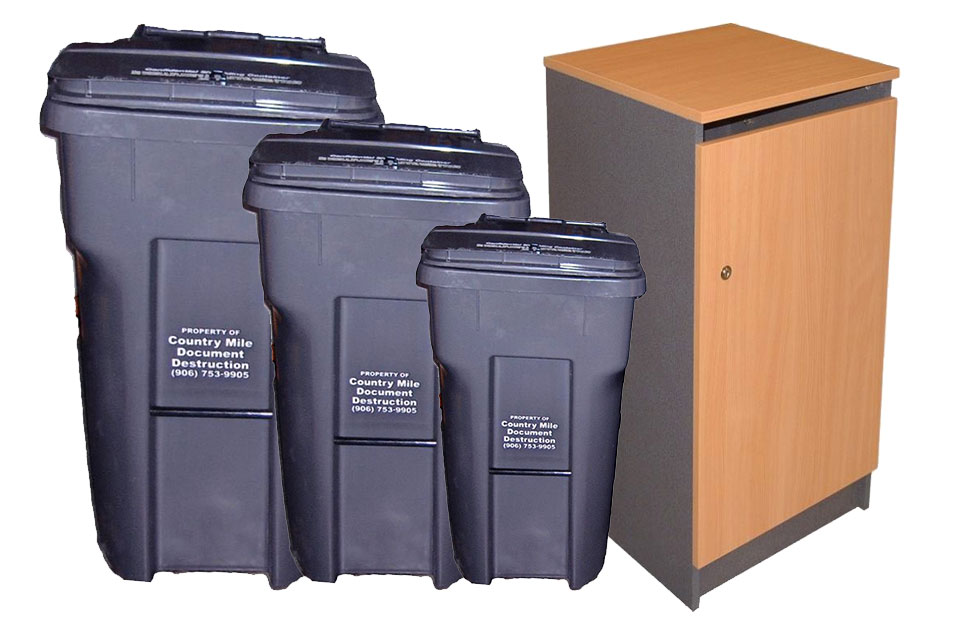
    An image of the lockable storage containers provided by Country Mile Document Destruction.
    Lockable Storage Containers

    You must follow clear dos and don’ts for secure document shredding to protect your business, employees, and customers from data exposure. This post explains what you can safely place in a Country Mile Document Destruction® container, which items require specialized disposal, and simple policies to strengthen your document destruction program.

    Importance of Document Security

    Securing documents protects your organization from identity theft, regulatory exposure, and costly remediation after a breach. By shredding PII-like Social Security numbers, bank details, and client records, you reduce the window for data theft and align disposal with retention policies. When you build secure destruction into daily workflows, you preserve customer trust and ensure sensitive paper is destroyed into confetti-sized pieces and recycled responsibly.

    Risks of Improper Disposal

    Improper disposal leaves your paper and e-media exposed to theft, fraud, and reputational damage. Electronics in regular bins raise fire risk-lithium batteries contributed to a 15% rise in fires at U.S. and Canadian facilities (373 to 430 incidents)-and mixing prohibited items can cause container damage, contamination, and potential regulatory scrutiny of your disposal practices.

    Benefits of Secure Shredding

    Secure shredding limits access and delivers consistent, auditable destruction: Country Mile Document Destruction® containers feature locks and a beveled slot to prevent retrieval, and reduce disposal liability. You also gain access to specialized e-media services for hard drives and CDs that shouldn’t enter normal shredding streams.

    Adopting an approach makes it simple for your team to dispose of non-retained documents immediately into locked containers; the variety of lock systems and beveled slots prevent tampering, while containers meet EPP standards. You manage high volumes securely, maintain compliance with retention rules, and minimize both physical and environmental risks by routing shredded material for responsible recycling.

    Dos: What Can Go into Secure Shredding Containers

    Most paper-based sensitive work information can go into a secure Country Mile Document Destruction® container: PII, financial reports, executive memos, budgets, HR files, and marketing research. You can toss stapled or clipped packets and small metal items like paper clips. Containers lock, keeping inserted documents inaccessible until they’re shredded and recycled.

    Sensitive Work Information

    Include documents that contain SSNs, bank and tax account numbers, payroll records, employment applications, contracts, NDAs, and patent drafts – anything that could be used for identity theft or compromise intellectual property. You should shred budget spreadsheets, hiring plans, and procurement bids from C-suite, accounting, HR, R&D, and sales teams to limit exposure.

    General Guidelines for Disposal

    Follow your company retention schedule and legal-hold procedures before disposal; some records must be kept for years. You should never mix prohibited items – electronics, lithium batteries, syringes, or glass – into containers because they pose fire, contamination, or damage risks (electronics-related fires rose 15% in recent U.S./Canada reports).

    Set a documented retention schedule: tax documents are commonly kept 3-7 years, employment and benefits files often 3-7 years after termination, and contracts are typically retained for six years beyond completion in many jurisdictions. Train staff, label confidential streams, audit disposal practices quarterly, and schedule container pickups weekly or by fill level to prevent overflow and unauthorized access.

    Don’ts: What Cannot Go into Secure Shredding Containers

    Do not place items that pose fire, biohazard, chemical, or mechanical risk into secure shredding containers; electronics, sharps, pressurized cans, glass, and hazardous waste can damage containers, create safety hazards for collection crews, contaminate recycling streams, and may void service agreements if improperly disposed.

    Electronics and Their Risks

    Many electronic devices contain lithium batteries that can overheat, ignite, or explode when compressed. Paper-reported fires at U.S. and Canadian waste facilities climbed 15%, from 373 to 430 incidents. You should route laptops, phones, and e-media to certified e-waste or hard-drive destruction services; Country Mile Document Destruction® offers specialized e-media disposal to protect both data and safety.

    Other Hazardous Items

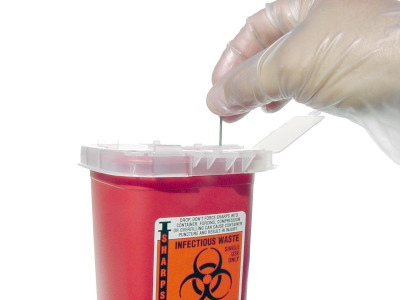
    Syringes, glass, ink/toner cartridges, aerosol cans, batteries, chemicals, and even food can puncture containers, contaminate recyclables, or create biohazard exposures. You should segregate these materials and use designated hazardous-waste, medical-sharps, or manufacturer take-back programs instead of placing them in a secure shredding container.

    For example, put needles in approved sharps containers and schedule medical-waste pickup; return ink and toner to vendors or certified recyclers due to heavy-metal contents; recycle fluorescent bulbs and dispose of aerosols through local hazardous-waste collections because mercury and pressurized propellants pose disposal risks. You should follow OSHA and local regulations for handling, labeling, and documentation.

    Implementing a Policy

    Policy in practice

    Mandate that all non-retained papers go into locked Country Mile Document Destruction® containers and consult your retention schedule before disposal; finance records, for example, often require multi-year retention. Set weekly pickups for offices with more than 50 staff and biweekly for smaller teams, and run 15-minute onboarding plus quarterly refresher training. Perform quarterly audits-aim for >95% compliance-logging chain-of-custody and vendor destruction certificates for verification.

    Features of Country Mile Document Destruction® Security Containers

    Design and Security

    The containers offer multiple lock systems for tiered access control, and are compliant with Environmentally Preferred Product (EPP) standards. You can toss stapled or clipped documents and small metal items like paper clips without separating them, while avoiding electronics, syringes, or other prohibited items per the materials acceptance policy.

    Additional Data Protection Strategies

    Layered safeguards

    You should encrypt stored files with AES‑256 and use TLS 1.2+ for data in transit, enable multi‑factor authentication (MFA)-which Microsoft reports blocks over 99.9% of automated account attacks-and run quarterly compliance audits plus annual phishing simulations to cut click rates by up to 50%. Maintain chain‑of‑custody logs and CCTV during on‑site destruction, classify documents so high‑risk items receive immediate on‑site shredding, and set retention schedules aligned with your legal and company policies.

    Final Words

    Hence, you should treat document disposal as a security task: use Country Mile Document Destruction® containers for sensitive paper, follow your retention policy before discarding, never place electronics, syringes, or hazardous items in shredding bins, and enforce a shred-all culture so your organization and clients stay protected.

    Related Blog Posts

  • Understanding How Long You Should Keep Tax Documents

    You need clear guidance on how long to keep tax documents to protect your finances and comply with the law; this guide explains retention timelines, which documents to keep, secure storage options, and safe disposal practices so you can confidently manage returns, support audits, and safeguard sensitive information with professional-grade solutions from Country Mile Document Destruction.

    Types of Tax Documents

    You should keep a mix of returns, income statements, deduction support, and property records: the IRS recommends retaining returns at least three years, six years if you underreported income by 25% or more, seven years for worthless securities or bad debt claims, and indefinitely for unfiled or fraudulent returns. After you sell or dispose of property, maintain related records until the statute of limitations for that tax year has passed.

    • Federal tax returns and accompanying schedules
    • W-2s, 1099s, and other income statements
    • Receipts and invoices supporting deductions and credits
    • Property purchase, improvement, and sale documents
    • After: business payroll, invoices, and expense ledgers
    Form 1040 and SchedulesKeep at least 3 years; 6 years if 25%+ income underreported; indefinite if never filed or fraudulent
    W-2 / 1099 FormsRetained for 3 years with return; payroll W-2s are often kept 4 years for benefits and audits
    Receipts for DeductionsKeep 3 years generally; 7 years for bad debt or worthless securities, and for some tax credits
    Property Records (closing, improvements)Maintain until the period of limitations expires after the sale to substantiate the basis and capital gains
    Business Income & Expense RecordsHold 3-7 years, depending on filings; payroll and employment tax records typically 4 years or more

    Personal Tax Returns

    You should store filed Form 1040s, schedules, W-2s, 1099s, and supporting receipts for at least three years; if you underreported income by 25%, keep six years, and keep seven years for claims involving worthless securities or bad debt. Retain IRA and basis records until distributions are verified to avoid capital gains disputes.

    Business Tax Records

    For your business, keep income statements, invoices, receipts, payroll registers, Forms 941/940, and filed returns for a minimum of three years; maintain payroll/employment tax records for at least four years and asset depreciation or property records for seven years to support audits and basis calculations.

    If you face an employment tax audit, the IRS commonly reviews the last four years of payroll filings-so preserve Form 941s, W-3s, W-2 copies, and timecards; state sales-tax audits often look back 4-6 years, and retaining digitized records with secure offsite storage helps you retrieve specific invoices or receipts quickly during an examination.

    Tips for Retaining Tax Documents

    Adopt a year-and-type filing system, scan paper records to encrypted cloud storage (AES-256) with two-factor authentication, and keep an external encrypted backup; set reminders at 3, 6, and 7 years to review retention needs, retain property cost-basis until disposition, and keep originals for legal or loan purposes when required.

    • Organize by tax year and document type (W-2s, 1099s, receipts, mortgage statements).
    • Scan at 300 DPI, name files YYYY_Type_Entity (e.g., 2022_W2_EmployerXYZ) for fast retrieval.
    • Use cloud storage with AES-256 encryption and two-factor authentication; log access and maintain version history.
    • Retain receipts for deductible expenses: generally 3 years, 6 years for 25%+ underreporting, 7 years for worthless securities/bad debt.
    • Perceiving the threat of identity theft, shred unneeded paper and use certified document destruction or secure disposal services.

    Recommended Retention Periods

    You should keep most returns and supporting documents for at least three years from the filing date, hold records for six years if you underreported income by 25% or more, retain documents for seven years for worthless securities or bad debt claims, and keep property basis records until you sell the asset, plus the applicable statute of limitations.

    Exceptions to Retention Guidelines

    Certain situations require longer or indefinite retention: if you never filed a return or filed a fraudulent return, there is no statute of limitations, and records tied to ongoing audits, litigation, or IRS disputes must be kept until fully resolved to protect your position and preserve evidence.

    For example, if you claim a casualty loss from a natural disaster or are involved in a tax credit carryback, maintain documentation until the IRS closes the case and the appeals window expires; similarly, keep payroll and employment tax records at least four years after the tax becomes due or is paid when you run a business, and consult your state agency for longer state-specific retention periods.

    Step-by-Step Guide to Storing Tax Documents

    Step-by-Step Actions

    StepDetails
    1. Gather & sortCollect returns, W-2s, 1099s, receipts; sort by year and category (income, deductions, property).
    2. Set retentionLabel each file with retention: 3 years standard, 6 years if 25%+ underreporting, 7 years for worthless securities/bad debt.
    3. Choose storageDecide between physical (fire‑resistant safe or offsite) and digital (cloud with AES‑256 + MFA or encrypted external drive).
    4. Secure & back upApply encryption, strong passwords, and the 3‑2‑1 backup rule: 3 copies, 2 media types, 1 offsite copy.
    5. Label & indexUse consistent labels like YYYY_Type and maintain an indexed spreadsheet or DMS for quick lookup.
    6. Review scheduleSet calendar reviews at 3, 6, and 7 years to purge or extend retention based on audits or asset sales.
    7. Dispose securelyWhen eligible, shred paper and securely wipe or destroy digital copies; use certified shredding services for compliance.

    Choosing Storage Methods

    You should weigh accessibility versus security: keep active-year paper files in a locked, fire‑resistant safe (1-2 hour rating) and archive older years to an offsite provider for digital use, a reputable cloud with AES‑256 encryption, multi‑factor authentication, and an encrypted external backup following the 3‑2‑1 rule to guard against loss and breaches.

    Organizing for Easy Access

    You can speed retrieval by using a consistent naming convention (e.g., 2023_W2, 2023_1099-INT) and a single index, either an Excel manifest or DMS-with columns for year, document type, retention end date, and storage location (box number or cloud folder); that reduces time during audits or loan applications.

    Implement color‑coded folders or labels for years and categories, enable OCR on scanned PDFs for keyword search, and maintain a backup manifest stored offsite; set automated reminders 90 days before each file’s retention end date so you can review exceptions like asset sales or ongoing disputes before disposal.

    Factors Affecting Retention Duration

    Your retention timeline depends on statute of limitations, document type, and specific events; federal returns are generally three years, but exceptions extend that period. Keep receipts supporting deductions, records of property improvements, and employment tax files to match potential audit windows.

    • Federal audit window: 3 years
    • Underreported income (≥25%): 6 years
    • Worthless securities/bad debt: 7 years

    The IRS usually enforces the longest applicable period when rules overlap.

    Auditing Considerations

    If you face an audit, you must produce originals or reliable copies for the years under review; the IRS typically audits returns filed within three years, can go back six years for 25%+ underreporting, and has no limit for fraud or nonfiling. Keep detailed support for large deductions-Schedule C expenses, rental losses, and charitable gifts over $250-to substantiate claims and reduce penalty risk.

    Specific Circumstances

    If you have property transactions, retain purchase documents, improvement receipts, and records of depreciation until three years after the year you sell to prove basis; similarly, bad-debt or worthless-security claims generally require seven years, and employment tax records often need four years, so check your state’s rules if they differ.

    For example, if you claimed a Net Operating Loss carryback or carried forward credits, hold supporting calculations and third-party statements for at least five to seven years; when you receive an IRS notice or refund audit, keep all correspondence and evidence until the matter and any appeals are fully resolved, plus an additional three-year period to cover potential reassessments.

    Pros and Cons of Keeping Tax Documents

    Pros and Cons of Keeping Tax Documents

    ProsCons
    Proof for audits – supports deductions for 3-6 yearsPhysical storage costs and offsite fees
    Evidence for loan, mortgage, or grant applicationsGreater exposure to identity theft if not secured
    Records basis for property and capital gains calculationsTime spent organizing and retrieving old files
    Supports insurance claims and legal disputesComplexity from differing federal and state retention rules
    Digital backups speed recovery after loss or disasterDigital obsolescence and format migration needs
    Helps with accurate amended returns and carryforwardsCosts for secure destruction when purging records
    Facilitates business audits and compliance reviewsUnnecessary retention creates clutter and inefficiency
    Provides verifiable timelines for tax years and transactionsRetention beyond the statute of limitations yields little benefit

    Advantages of Retention

    You can substantiate deductions, credits, and income with files retained for the IRS audit windows-typically three years, six years for 25% underreporting, and seven years for certain bad-debt or worthless-security claims-so you avoid penalties, support loan applications, and preserve basis for property sales or amended returns.

    Disadvantages of Over-Retention

    Holding records longer than necessary increases your storage costs, raises the risk of identity theft if files aren’t secured, and creates administrative drag when you need to find or migrate documents across systems; many organizations incur recurring offsite or digitization fees for decades of paperwork.

    Over-retention also adds compliance complexity-different states have varied retention windows, digital formats require periodic migration, and chain-of-custody for sensitive files can become harder to prove; perform an annual records review and purge items once the applicable statute-of-limitations and business needs have passed.

    Secure Disposal of Tax Documents

    When your statute-of-limitations window closes, dispose of tax files using validated methods to eliminate exposure: shred paper to at least 3/32-inch cross-cut (DIN 66399 P-4 or higher), sanitize electronic media per NIST SP 800-88, and obtain a certificate of destruction to document compliance for audits and lending reviews.

    Methods for Safe Disposal

    Choose on-site mobile shredding for immediate destruction or sealed off-site pick-ups with chain-of-custody and GPS-tracked transport; for digital media, use NIST-approved secure erase, degaussing for magnetic drives, or physical destruction of SSDs/hard drives, and insist on vendor-provided destruction certificates and audit logs.

    Importance of Data Protection

    You face legal, financial, and reputational risk if tax records are exposed: per IBM’s 2023 Cost of a Data Breach Report, the average breach cost was $4.45M, and a single misplaced W-2 can trigger fraudulent refund claims. Secure disposal reduces breach likelihood and helps satisfy HIPAA, GLBA, and state regulations.

    Expand your protections by enforcing least-privilege access, encrypting stored files, conducting annual vendor audits, and keeping a documented retention-and-destruction policy; combining technical controls with employee training and certificates of destruction creates defensible evidence you followed industry best practices.

    Conclusion

    Drawing together the guidance on retention periods, secure storage, and disposal, you should keep tax records long enough to meet IRS and state requirements, protect sensitive data with encrypted digital or locked physical storage, and securely destroy documents when the limitation period has passed. Establish a consistent retention schedule, back up electronic copies, and consult professionals to align your practices with legal and business needs.

    Financial records carry the highest risk if they fall into the wrong hands, and simply tossing them in the trash isn’t protection—it’s an invitation. Country Mile Document Destruction’s financial document destruction service ensures bank statements, tax records, payroll files, and accounting reports are securely destroyed and fully unrecoverable. Their compliant, professional process helps you reduce liability, protect customer and employee data, and meet regulatory requirements without the headache. When it comes to financial information, peace of mind comes from knowing those documents are gone for good.


    Related Blog Posts

  • How much does document shredding cost?

    With increasing privacy risks and regulatory requirements, you need clear insight into how document shredding costs are calculated and which options fit your needs. This concise guide breaks down service types, pricing factors, and cost-saving strategies so you can select secure, compliant shredding solutions that align with your budget and retention policies.

    Types of Document Shredding Services

    You’ll encounter several common shredding models: onsite mobile trucks that destroy documents at your location, offsite secure facilities that shred by weight, scheduled recurring pickups for steady volume, and drop‑off options for occasional needs. You can compare visibility, turnaround, and pricing structure across these models to match your compliance and budget requirements. Assume that your choice will depend on volume, proximity, security level, and whether you need a certificate or witnessed destruction.

    • On-site: visible destruction, ideal for high-sensitivity material.
    • Off-site: typically lower per-pound cost, good for bulk purges.
    • Scheduled: predictable monthly or weekly service and billing.
    • Drop‑off: pay-per-visit convenience for individuals or small offices.
    Service TypeHow it works / Cost drivers
    Onsite Mobile ShreddingTruck visits, you can witness destruction; pricing driven by truck time and staff.
    Offsite Facility ShreddingSecure transport to plant, charged by weight or box count; economies at scale.
    Scheduled Recurring ServiceRegular pickups from bins or consoles; pricing based on bin count and frequency.
    Drop‑off / One‑time PurgeYou deliver boxes to a kiosk or center; flat fees or per-box rates are common.

    Onsite Shredding

    You can have a mobile shredding truck come to your site so you witness destruction and receive a certificate of destruction immediately; providers commonly process hundreds of boxes per hour and secure a chain‑of‑custody from your console to the shredder, making onsite services preferred when you handle PHI, financial records, or M&A materials that demand maximum transparency.

    Offsite Shredding

    You send sealed containers to a secure facility where material is logged, weighed, and shredded in batches; many vendors price off-site work by the pound, and a standard banker box (~2,500-3,000 sheets) typically weighs about 20-30 lb, which helps you estimate per‑box costs when comparing bids.

    Facilities often include CCTV, audited intake logs, and a certificate of destruction; turnaround can range from same‑day to several business days depending on pickup schedules, and bulk jobs usually lower your per‑pound price-for example, consolidating 50 banker boxes can materially reduce the unit cost versus single‑box drop‑offs.

    Factors affecting document shredding costs

    You’ll pay based on volume, frequency, security level, and service type; a banker box (2,500-3,000 sheets) or a 65-95 gallon console shifts pricing and handling. Shredding 5 banker boxes onsite can take 15-30 minutes; offsite consolidation reduces per-box handling for large jobs.

    • Volume: boxes, pounds, or cubic feet
    • Frequency: one‑time, weekly, monthly, quarterly
    • Service: onsite mobile vs offsite plant and chain‑of‑custody

    After you map these factors against your retention policy, you can choose the most cost‑effective service.

    Volume of Documents

    You should quantify volume by banker boxes, file drawers, or stack height; a standard banker box holds 2,500-3,000 sheets, and one inch of paper equals about 200 sheets. If you have 1-3 boxes, drop‑off or one‑time offsite shredding is usually cheapest; 10+ boxes push you toward bulk or scheduled services. Bound reports, cardstock, and mixed media increase handling time and may be charged by weight, so factor those into your estimate.

    Frequency of Service

    You’ll decide between one‑time purges and recurring pickups, weekly, biweekly, monthly, or quarterly, based on document generation. Regular pickups reduce on‑site storage and can lower per‑box handling when routes are optimized. Ad hoc shredding fits occasional purges but often carries higher per‑pickup labor and transport costs. Consider how many boxes you produce per month to pick the right cadence.

    For example, if you generate roughly 5 banker boxes monthly, a monthly pickup usually suffices; producing 20 boxes monthly typically justifies a weekly console or onsite mobile visit. Recurring contracts are commonly priced by bin and pickup, so increasing frequency raises service costs but can prevent compliance risk and overflow fees-balance cost against the operational risk of excess on‑site confidential material.

    Estimating How Much Paper You Have to Shred

    Quick volume and weight check

    Count boxes and drawers: a standard banker box holds about 2,500-3,000 sheets, a file drawer 1,500-2,000, and one inch of paper ≈200 sheets. Weighing helps-ream (500 sheets) is about 5 lb, so 2,500 sheets ≈25 lb; you can use this to estimate truckload and price. For example, 10 banker boxes (~25,000 sheets) equal roughly 125 lb and may qualify for bulk one-time pricing; remove binders and clips to avoid extra handling fees.

    Shredding Pricing

    Pricing depends on service type, volume, and security needs. Offsite bulk shredding is typically priced per banker box (2,500-3,000 sheets) or by weight, while onsite truck services add labor and travel fees. You’ll see quotes that account for pickup frequency, bin counts, and chain-of-custody documentation; large purges often use flat fees. Always request a written estimate and a Certificate of Destruction to verify scope and compliance.

    Bulk One-Time Shredding

    Offsite one-time shredding commonly charges per banker box ($2-$7/box) or per pound ($0.10-$0.30/lb), which is cost-effective if you can drop off large volumes. On-site one-time shredding brings a locked truck to your site for witnessed destruction and usually carries truck or minimum-service fees, often $200- $500-plus per box or hourly labor charges. Get an itemized quote before scheduling to avoid surprise costs.

    Recurring Shredding Services

    Recurring services are priced by the number and size of consoles or bins plus pickup frequency; monthly service often runs about $20-$60 per console, with higher rates for weekly or daily collections. You’ll receive routine chain-of-custody documentation and a Certificate of Destruction after each pickup, which supports regulatory compliance and audit trails for your organization.

    To size a recurring program, track your daily discard: a small office usually needs 1-2 consoles, a mid-size company 5-10, and larger enterprises dozens. Consolidating collection points, selecting appropriate bin sizes, and adjusting pickup cadence can reduce costs. Clients often see 15-30% savings by optimizing routes and frequencies.

    Tips for cost savings

    You can lower shredding expenses by consolidating sessions, scheduling monthly offsite pickups instead of weekly onsite service (monthly pickups can cut recurring costs by ~30%), and removing non-paper items to avoid extra handling fees.

    • Consolidate: combine departments into one monthly pickup to reduce per‑bin charges.
    • Digitize: scan and destroy legacy records. Digitization often eliminates 60-80% of physical files.
    • Use off-site bulk shredding for one‑time purges to save up to 40% versus onsite.

    Recognizing these tactics helps you balance cost and security while lowering annual shredding spend.

    The Importance of Document Security

    Security impact

    You should treat document destruction as part of risk management: about 60% of small businesses close within six months after a data breach, so shredding volumes, like a banker’s box holding ~2,500-3,000 sheets, or scheduling monthly onsite pickups, reduces exposure. Cross‑cut shredding makes reconstruction impractical, chain‑of‑custody logs support HIPAA and PCI audits, and avoiding ad‑hoc disposal helps you stay compliant against fines (HIPAA up to $1.5M, GDPR up to 4% of global revenue).

    Conclusion

    Considering all points, you can balance cost and security by assessing volume, selecting on-site or off-site shredding, and choosing recurring pickups if you produce regular waste. Consolidate purges, remove non-paper items, and compare our plans to lower per-unit fees while maintaining chain-of-custody standards. With the right mix of methods and a reliable provider, your shredding expenses become predictable and aligned with your compliance needs.


    Stacks of old paperwork don’t just take up space—they quietly increase your risk every day they sit around. Country Mile Document Destruction’s secure document destruction service helps you clear the clutter while protecting your business, your clients, and your reputation. From routine purge jobs to ongoing shredding programs, they make the process easy, affordable, and fully compliant, so sensitive information is destroyed the right way—every time. It’s a smart, stress-free way to stay organized, avoid data breaches, and focus on running your business instead of worrying about what’s sitting in a file cabinet.


    Related Blog Posts

  • A Guide to Hard Drive Destruction for Data Security

    There’s a real risk that discarded hard drives retain sensitive data even after wiping or reformatting, so you should use certified physical destruction services that provide a certificate of destruction; magnets, degaussing, or stockpiling are unreliable, and DIY smashing is unsafe. Professional shearing, crushing, or shredding prevents reconstruction and helps you protect your organization while meeting compliance and audit requirements.

    Types of Hard Drive Destruction

    ShreddingIndustrial shredders reduce drives to 2-4 mm particles, preventing platter reconstruction; certified vendors provide certificates of destruction.
    Crushing / ShearingCrushers deform platters; shears sever drives into pieces-both disrupt platters physically and are effective for HDDs when done to spec.
    DegaussingHigh‑field degaussers (≈1 Tesla+) erase magnetic media but won’t affect SSD flash and may not guarantee full recovery prevention for modern drives.
    Software WipingOverwrite methods (single‑pass zero, multi‑pass like DoD 5220.22‑M) target magnetic media; NIST SP 800‑88 provides wiping and verification guidance.
    Secure Erase / Crypto‑EraseATA Secure Erase, manufacturer utilities, or cryptographic erasure are preferred for SSDs; verification and vendor tools (e.g., Blancco) ensure effectiveness.

    Physical Destruction Methods

    You should prioritize professional shredding, crushing, or shearing when permanency is required; industrial shredders produce 2-4 mm fragments, crushers bend or fracture platters, and shears cut drives into unrecoverable pieces, while certified vendors provide a chain‑of‑custody and a certificate of destruction to meet compliance obligations.

    Data Wiping Methods

    When you choose software wiping, apply standards-based procedures-NIST SP 800‑88 recommends erasure tailored to media type; legacy DoD 5220.22‑M three‑pass methods persist, but verification is crucial, and SSDs often need different approaches like ATA Secure Erase or cryptographic erase.

    For more depth, you should verify wipes with forensic-level validation: use tools such as Blancco or vendor utilities that log successful erasure, and maintain exportable reports; note that simple reformatting or single-pass zeroing can leave recoverable remnants on magnetic media and is ineffective for many SSD controllers, so match method to media, keep audit records, and consider combining a secure erase with physical destruction for high‑risk data.

    • Choose a method matched to media: shredding/crushing for HDDs, ATA secure erase/crypto‑erase for SSDs.
    • Insist on vendor certificates and forensic verification reports to satisfy auditors and regulators.
    • Any hard drive disposal plan should document the method, chain‑of‑custody, and certificate of destruction.

    Step-by-Step Guide to Hard Drive Destruction

    Preparing for DestructionPreparing for Destruction Before destruction, you inventory every drive-log serial number, model, and last user, and create chain-of-custody records. Verify backups and legal retention periods (for example, 7 years for some financial records), then disconnect devices from networks and move media to a secure staging area. Label drives with batch IDs and dates, schedule certified pickup or onsite service, and for batches of 50+ units, use sealed transport and GPS-tracked vehicles.
    Executing the Destruction ProcessExecuting the Destruction Process When you execute destruction, choose a certified method-shearing to fragment platters (commonly to under 12 mm) or crushing with several tonnes of force, performed by a NAID‑certified vendor. Require tamper‑evident seals, a logged chain‑of‑custody, and a certificate of destruction that lists serials, method, operator, and date. Prefer onsite shredding for high‑risk data and demand video or witness verification for auditability. During the operation, match each drive’s serial number against the manifest before and after processing, check machine settings (shear gap or crush pressure), and confirm downstream recycling complies with e‑waste rules. Request a PDF certificate plus a digital audit trail with time‑stamped photos or video; retain certificates for statutory periods (typically 3-7 years) and perform spot checks on 5-10% of batches to validate destruction.

    Factors to Consider Before Destruction

    You should assess asset type, data classification, and regulatory obligations before selecting a destruction method; SSDs, for example, can retain remnant data after standard wipes and often need physical destruction or secure degaussing alternatives. Inventory the number and location of drives so you can choose on-site versus off-site services, and verify vendor accreditations like NAID. Confirm chain-of-custody and proof-of-destruction requirements for audits. Perceiving the full operational and compliance impact will guide a defensible, cost-effective plan.

    • Regulatory obligations and audit requirements
    • Device type (HDD vs SSD) and data sensitivity
    • Volume, logistics, and onsite vs offsite destruction
    • Chain-of-custody, certificates, and vendor accreditation

    Compliance Regulations

    You must align destruction practices with laws such as GDPR (fines up to 4% of global turnover or €20 million) and HIPAA (civil penalties that can reach $1.5 million per year per violation category), plus industry rules like PCI-DSS. Maintain retention schedules, documented policies, and a certificate of destruction to show auditors you followed required controls; many regulators expect verifiable, auditable proof rather than informal disposal notes.

    Environmental Concerns

    You need to factor in e‑waste impacts: the Global E‑waste Monitor documented over 53 million metric tonnes of e‑waste in 2019, and hard drives contain lead, mercury, and rare metals. Select vendors that separate recoverable metals and responsibly recycle circuit boards to reduce landfill and liability, and verify compliance with local disposal laws to avoid environmental penalties.

    When you dig deeper, check recycler certifications such as R2 or e‑Stewards, which mandate responsible handling and downstream vendor controls; insist on a documented chain of custody and ask for material recovery reports. Many professional destruction services combine shredding with certified recycling streams, recover steel and aluminum platters, and can provide diversion metrics and manifests for sustainability reporting and regulatory audits.

    Tips for Effective Hard Drive Destruction

    You should enforce a documented chain-of-custody, mandate verified physical methods (shearing or crushing), and schedule purges quarterly for high-risk systems, annually for general endpoints. Use tamper-evident containers for transport and require a certificate of destruction that lists serial numbers, method, and operator. Prefer vendors offering on-site mobile shredding to minimize transit exposure, and link every disposal record to your CMDB or asset-management system for auditability.

    • Verify inventory: model, serial number, and asset tag before transfer.
    • Segregate drives by type and sensitivity-SSDs differ from HDDs in destruction needs.
    • Require witnessed or on-site destruction and timestamped evidence (photos/video).
    • Assume that you retain certificates and supporting records for 3-7 years to satisfy common regulations and audits.

    Choosing the Right Service Provider

    You should select a vendor like Country Mile Document Destruction that has NAID/industry certification, adequate insurance, and on-site destruction capability; ask for shred specifications (for example, particle size targets such as <2 mm for media), chain-of-custody tracking, and sample certificates. Request client references from similar industries, confirm whether they provide tamper-evident containers and real-time tracking, and verify SLA response times for emergency pickups.

    Documenting the Process

    Document each drive with serial number, asset tag, assigned owner, destruction method, date/time, technician name, certificate ID, and location; capture timestamped photos or video of the destruction and store encrypted digital records in your asset system. Retain these records for 3-7 years, depending on regulatory and internal policy.

    Use a standardized destruction template that links certificate IDs to CMDB entries, includes signed chain-of-custody manifests at every transfer point, and records witness initials and unique certificate numbers; during audits, match serial numbers to disposal certificates and provide photographic or video proof. Automate retention and secure backups so documentation is readily available for compliance reviews and incident investigations.

    Pros and Cons of Various Destruction Methods

    You’ll want a concise comparison to pick the right method for your inventory, risk tolerance, and compliance requirements; the table below lists common techniques, practical benefits, and real limitations. Note SSDs often behave differently than HDDs, and NIST SP 800-88 recommends different approaches depending on media type.

    ProsCons
    Physical shredding: irrecoverable fragments, accepted by auditorsHigher cost, requires transport or on-site equipment
    Crushing: quick on-site disablement, minimal handlingMay not destroy all platters; not suitable for SSD secure erase
    Degaussing: fast for magnetic media, erases the entire magnetic surfaceUseless for SSDs and drives with encrypted firmware
    Overwriting/Wiping: low cost, can meet legacy standards (e.g., 3‑pass methods)Ineffective on SSDs due to wear leveling; forensic recovery is possible
    Cryptographic erase: instant key destruction for encrypted drivesOnly works if full-disk encryption was implemented correctly
    Drive dismantling: separates platters for targeted destructionLabor-intensive and may leave small recoverable fragments
    Incineration: complete media destruction when permittedEnvironmental, regulatory, and facility constraints apply
    Professional services: chain-of-custody and certificate of destructionService fees and scheduling required; verify provider credentials
    Recycling after certified destruction: sustainable disposalRecycling alone without destruction risks data exposure

    Advantages of Physical Destruction

    You get certainty: when drives are shredded or pulverized to industry standards, data reconstruction is imperatively impossible, auditors accept certificates of destruction, and you avoid SSD-specific issues like wear leveling. Using a certified provider also preserves the chain of custody and simplifies compliance reporting for audits and regulations.

    Disadvantages of Data Wiping

    You risk incomplete sanitization: wiping can be time-consuming for large fleets, may miss remapped or bad sectors, and often fails on SSDs where controllers and wear leveling leave copies in overprovisioned areas, forcing you to rely on uncertain outcomes rather than provable destruction.

    More specifically, SSDs often relocate data to spare blocks and maintain firmware-managed pools that overwrites don’t touch; forensic labs regularly recover data from drives thought to be wiped, and regulatory bodies increasingly require verifiable destruction or cryptographic erase with documented processes, so relying solely on software wiping can leave you noncompliant and exposed.

    Best Practices for Ongoing Data Security

    You should treat destruction as part of your asset lifecycle: tag assets at procurement, log serial numbers, retire devices at end-of-life (commonly 3-5 years), and schedule destruction events tied to inventory reviews. Align procedures with NIST SP 800‑88, require certificates of destruction, and retain destruction records for audit windows (commonly 3-7 years) to provide documented proof for inspectors and clients.

    Regularly Scheduled Destruction

    Set cadence by risk profile: high-risk areas (HR, finance, healthcare) get monthly or quarterly pickups, while general IT assets follow quarterly to annual cycles. Automate alerts when devices exceed lifecycle thresholds, consolidate units for on-site shredding or certified off-site destruction, and maintain chain-of-custody logs plus certificates; many mid-sized firms run quarterly collections and retain certificates for seven years to satisfy HIPAA or PCI-DSS audits.

    Employee Training on Data Security

    Make end-of-life procedures part of mandatory onboarding within 30 days and require annual refreshers that cover asset identification, chain-of-custody, and preparation steps (battery removal, labeling). Use role-based modules for IT, facilities, and procurement, test knowledge with short quizzes, and run simulated audits so your team executes destruction workflows reliably and documents compliance.

    Emphasize measurable outcomes: require 90-95% completion rates, collect signed attestations, and run tabletop exercises twice yearly that simulate lost or misrouted drives. Provide 10-15 minute microlearning clips on secure transport and handling, link training records to asset tags, and track remediation actions so you can demonstrate effective human controls during compliance reviews.

    Conclusion

    So you must treat end-of-life drives as active security risks: use certified physical destruction (shredding or crushing) by professionals, obtain a certificate of destruction to prove compliance, and avoid relying on wiping, magnets, or stockpiling to protect your data.


    If you’re hanging on to old hard drives and hoping they’re “probably fine,” that’s a risk no business can afford. Country Mile Document Destruction’s hard drive destruction service gives you a clean, final solution—your data is permanently destroyed, your compliance worries are gone, and your reputation stays intact. Think of it like locking the door and throwing away the key. Whether you’re upgrading computers, closing out old projects, or cleaning up storage, their secure, documented process ensures sensitive client, employee, and financial data can never be recovered. It’s simple, cost-effective, and gives you real peace of mind—because data protection should be certain, not assumed.


    Related Blog Posts

  • Guide to HIPAA Compliant Medical Document (PHI) Shredding

    HIPAA

    Over the course of this guide, you will learn how to securely destroy protected health information (PHI) to meet HIPAA requirements, assess retention and disposal timelines, and choose professional shredding options that render records irrecoverable. You’ll get clear steps for on-site and off-site shredding, documentation practices like Certificates of Destruction, and how Country Mile Document Destruction supports your compliance and patient privacy through ISO-certified, auditable processes.

    Understanding HIPAA Compliance

    You must implement administrative, technical, and physical safeguards under HIPAA’s Privacy and Security Rules (enacted 1996), including written policies, workforce training, business associate agreements, and documented destruction procedures; HHS penalties range from $100 to $50,000 per violation, so your shredding processes and Certificates of Destruction directly affect compliance.

    Overview of HIPAA Regulations

    HIPAA’s Privacy Rule governs uses and disclosures of PHI, the Security Rule requires safeguards for ePHI, and the Breach Notification Rule obligates you to report breaches affecting 500 or more individuals to HHS and the media; you must also execute BAAs with vendors and maintain audit trails for disposal and access.

    Importance of PHI Protection

    Protecting PHI preserves patient trust and reduces identity-theft exposure. Data breaches have exposed millions of records nationally, and help you avoid OCR investigations; civil fines can reach $50,000 per violation, and serious incidents have resulted in six-figure penalties and criminal prosecution.

    To operationalize protection, you must shred paper to cross-cut standards, render hard drives unrecoverable with certified destruction, adhere to retention schedules (HIPAA often requires ten years), train staff on chain-of-custody, obtain Certificates of Destruction, and keep logs and BAAs ready for auditors and for remediation within the 30-day correction window.

    Types of Medical Documents to Shred

    You handle many document types that require secure destruction: patient charts, billing records, consent forms, lab results, and imaging reports. Shred any paper containing one or more of the 18 HIPAA identifiers-names, SSNs, dates, medical record numbers, or full-face photos-as well as appointment logs and billing remittances; examples include EOBs and insurance claims. Use cross-cut shredding or certified off-site services to meet audit demands. Thou must treat each category as PHI and dispose of it according to retention and state laws.

    • Patient charts and clinical notes
    • Billing, claims, and EOBs
    • Lab results and pathology reports
    • Imaging reports and films/PACS exports
    • Prescriptions, consent forms, and appointment logs
    Patient ChartsProgress notes, diagnoses, treatment plans; retain per state law, shred after retention
    Billing & InsuranceClaims, EOBs, payment records with SSNs or account numbers; high risk for identity theft
    Laboratory & PathologyTest results, specimen logs; include identifiable specimen labels and accession numbers
    Imaging & RadiologyReports, CDs, DICOM exports from PACS; contains dates, identifiers, and clinical findings
    Medication & ConsentPrescriptions, medication histories, and signed consents often include signatures and dates

    Identifiable Health Information

    You must shred documents containing any of the 18 HIPAA identifiers: name, address, SSN, DOB, MRN, insurance numbers, biometric data, and full-face photos. Examples include signed consent forms, clinical notes with diagnoses, lab worksheets, and immunization records. HIPAA defines PHI as individually identifiable health information linked to these identifiers, and improper disposal has resulted in fines of $100 up to $50,000 per violation when not corrected. Ensure documented chain-of-custody for shredded batches to support audits and breach investigations.

    Electronic Records

    You should treat ePHI-EMR/EHR exports, PACS images, backup tapes, hard drives, USBs, and cloud exports like paper PHI; simple file deletion or formatting won’t render data unrecoverable. Apply NIST SP 800-88 sanitization methods (clear, purge, destroy) and use validated tools: degaussing or crypto-erase for magnetic media, and physical destruction for media that cannot be reliably sanitized. For third-party or cloud vendors, verify contractual deletion, encryption-at-rest, and obtain Certificates of Destruction.

    You must assess media type before disposal: HDDs can be degaussed or physically shredded, while SSDs typically require crypto-erase or physical destruction because degaussing is ineffective. Follow NIST SP 800-88: use “clear” only for reuse in controlled environments, “purge” (degauss/crypto-erase) when retiring equipment, and “destroy” for devices at the end of life or with failed hardware. Also, verify vendor audit reports, maintain chain-of-custody logs, and secure Certificates of Destruction to demonstrate compliance during inspections.

    Tips for Effective Medical Document Shredding

    You should treat shredding as an operational process tied to retention schedules, secure collection, and verifiable destruction:

    • Align disposals with HIPAA/state retention (HIPAA guidance: retain records up to 10 years).
    • Use locked consoles emptied weekly or by volume; schedule mobile on-site shredding for high-volume clinics.
    • Demand cross-cut destruction and a Certificate of Destruction (COD) with chain-of-custody documentation. Country Mile Document Destruction does more than cross-cut. It reduces the paper to a recyclable pulp.

    This helps you demonstrate compliance during audits and reduce PHI exposure risk.

    Selecting a Reliable Shredding Service

    Vet providers by requesting certifications (NAID AAA, ISO 9001), proof of background checks, $1M+ liability coverage, SOC/SSAE reporting, GPS-tracked on-site trucks, and a COD for every job; insist on cross-cut, particle-size specs, or to be reduced to a pulp, and sample audit logs so you can verify destruction metrics and chain-of-custody at any time.

    Employee Training and Awareness

    Train staff at onboarding and annually, with 15-30 minute role-based modules and quarterly refreshers; require signed acknowledgement, track completion rates (target >95%), and run monthly spot checks of locked bins so your team consistently follows shredding protocol and retention rules.

    Expand training with hands-on exercises: run quarterly mock audits where randomly selected bins are audited for misfiled PHI, document corrective actions, and include tabletop incident-response drills yearly; track KPIs such as audit pass rate and incident count monthly to show continuous improvement and support compliance records.

    Step-by-Step Shredding Process

    StepAction
    Pre-ShreddingInventory, segregate PHI, use locked consoles, document chain-of-custody, and schedule pickups
    ShreddingOn-site mobile or off-site facility; cross-cut, micro-cut for paper, or reduce to a recyclable pulp; degauss/physically destroy for drives
    Post-ShreddingCollect Certificate of Destruction (COD), log weights/dates, and verify recycling or secure disposal

    Pre-Shredding Preparations

    An image of the lockable storage containers provided by Country Mile Document Destruction.
    Lockable Storage Containers

    You inventory and classify records by retention rules, remove non-PHI materials, and place PHI in locked consoles or sealed bags. Use signed chain-of-custody forms that list date, time, employee ID, and estimated weight at pickup. Train staff on separation and labeling; for example, a 50-provider clinic reduced misfiled PHI by 60% after instituting weekly audits and locked drop-boxes.

    Shredding Methods and Techniques

    An image of a mobile shredding truck of Country Mile Document Destruction
    Shredding Truck

    You choose between on-site mobile shredding, where a truck shreds in view, and off-site facility shredding with secure transport. For paper PHI, require cross-cut or micro-cut shredders that render documents indecipherable; for electronic media, follow NIST SP 800-88 guidance. On-site visits can be scheduled weekly, monthly, or for single cleanouts, depending on your document volume.

    For greater assurance, select DIN 66399 P‑4 or higher for confidential medical files and consider micro-cut for billing/consent forms. For hard drives, combine degaussing and physical destruction or HDD crushers that fracture platters; solid state drives need physical pulverization or NIST‑recommended sanitization. Many providers log shredded tonnage and provide video or witness options for high-risk disposals.

    Post-Shredding Procedures

    You obtain a Certificate of Destruction that lists date, method, weight, and provider signature, and retain it in your compliance files. Verify the COD matches your pickup log and chain-of-custody records. Also, confirm whether shredded material is recycled or incinerated, and request recycling receipts when environmental reporting matters to your organization.

    After shredding, archive CODs and pickup logs to support audits and HIPAA inquiries; include photos or timestamps if available. Audit your vendor quarterly for diversion rates and secure transport compliance, and test a sample of shredded output periodically to ensure particle size meets your policy. This helps demonstrate that PHI was rendered unreadable and irreconstructible.

    Factors to Consider for Shredding Services

    You should evaluate security, certifications, and operational details before signing a contract:

    • On-site vs. off-site shredding – on-site reduces transit exposure
    • Chain-of-custody, BAAs, and audit logging
    • Shred type – cross-cut or micro-cut, particle size, or a recyclable pulp
    • Certificate of Destruction and retention of receipts

    After you select a vendor, require periodic audits and monthly pickup records to verify ongoing compliance.

    Compliance with HIPAA Standards

    You must ensure your vendor will sign a Business Associate Agreement (BAA), maintain chain-of-custody documentation, provide a Certificate of Destruction, and use shredding methods that render PHI unreadable and unreconstructible; NAID AAA or ISO 9001 certifications, plus on-site shredding options and detailed audit logs, materially reduce your exposure to fines ranging from $100 to $50,000 per violation.

    Environmental Considerations

    You should choose shredding services that recycle shredded paper and responsibly handle e-waste, verifying diversion rates and recycling partners to avoid landfill or incineration and to support your sustainability goals.

    Request specific metrics from providers: percentage of material diverted from landfill, names of paper mills or pulping facilities, and electronics certifications such as R2 or e-Stewards; for example, a vendor that documents >90% diversion with mill receipts and offers on-site mobile shredding demonstrates both secure destruction and reduced CO2 from fewer transport trips.

    Pros and Cons of Using Professional Shredding Services

    Pros and Cons of Professional Shredding Services

    ProsCons
    Regulatory compliance support with Certificates of Destruction and chain-of-custody records.Higher recurring cost compared with in-house shredders and staff time.
    Certified destruction methods (cross‑cut, ePHI sanitization) that meet HIPAA standards.Scheduling constraints – pickups often follow weekly or monthly routes, not immediate on demand.
    On‑site mobile shredding lets you watch the destruction and reduces reconstruction risk.Off‑site services introduce transport windows unless you require on‑site destruction.
    Audit trails and documentation simplify audits and are ISO 9001 certified by NSF‑ISR.Contracts or minimums may apply, creating fixed costs for smaller practices.
    Frees staff time – you avoid training, supervision, and retention liability for shredded PHI.Vendor vetting needed; inadequate providers can expose you to compliance risk.
    Recycling and responsible disposal pathways for paper and e‑waste.Additional fees can apply for hard‑drive or specialty media destruction.
    Reduces risk of HIPAA fines (civil fines up to $50,000 per violation; criminal penalties possible).Peak‑season or last‑minute cleanouts may incur rush fees or delays.

    Advantages of Professional Services

    You gain documented compliance-Certificates of Destruction, chain‑of‑custody logs, and certified cross‑cut or ePHI destruction-that help you avoid HIPAA fines (civil penalties can reach $50,000 per violation) and simplify audits. Many vendors, including ISO‑certified providers, offer on‑site mobile shredding so you can verify destruction, schedule regular pickups, and eliminate staff time spent handling PHI.

    Potential Drawbacks

    You may face higher recurring costs, minimum‑volume contracts, and scheduling limits that don’t match urgent needs; off‑site shredding can introduce short transport windows unless you insist on on‑site destruction. Vetting vendors for certifications and insurance is necessary to avoid added compliance risk.

    In practice, you should request the vendor’s COD, proof of ISO or SOC reports, background check policies, and insurance limits before signing. Some providers charge per bin or per pound and impose minimum monthly fees, so compare quotes and contract terms; if you need immediate disposal for a one‑time purge, expect one‑time or rush fees. Choosing on‑site mobile shredding removes most transport concerns and preserves a visible audit trail.

    Summing up

    So you must ensure your practice disposes of PHI by rendering it unreadable and unrecoverable; use certified HIPAA-compliant shredding services like Proshred®️ Security for on-site or off-site cross-cut destruction, documented with Certificates of Destruction, to meet retention rules, reduce liability, and protect your patients’ privacy.


    Related Blog Posts

  • A Guide to Sharps Container Disposal

    With this guide, you will learn what counts as an approved sharps container, how to prepare and seal it safely, and the disposal options available to you for your safe disposal, drop-off sites, mail-back programs, HHW collections, and special pickups. Disposal rules vary by location, so use the Michigan EGLE sharps collection list PDF to find county-specific drop-off sites and the Wisconsin DNR sharps collector map to locate local options; never place sharps containers in regular trash or recycling.

    Selecting the Right Container for Sharps Disposal

    Red sharps container with biohazard symbol for safe disposal of needles and medical sharps.
    Certified Sharps Container

    Match container size and certification to your use: retail sharps containers commonly run 1–2 gallons (4–8 L) for home use, while clinics use larger, lockable bins; mail-back programs send FDA-cleared, postage-paid containers designed for shipping. Choose based on how often you dispose, storage space, and your planned disposal route, drop-off, HHW event, or mail-back. Verify local acceptance using Michigan’s county list and Wisconsin’s collector map.

    Characteristics of an Approved Sharps Container

    Look for puncture-resistant, rigid plastic with a tight-fitting, resealable or locking lid and a leak-proof bottom; many approved containers meet ANSI or FDA guidance and include a fill line and clear “SHARPS” labeling. Capacity should suit your usage: small (≈1 quart) for travel, 1–2 gallons for home, and a tamper-resistant closure prevents accidental openings. Avoid glass or thin plastics and tape the lid shut once full; date and seal before transport.

    DIY Options: When to Create Your Own Container

    Repurposed detergent bottles labeled for safe use as makeshift sharps containers.
    Repurposed detergent bottles labeled for safe use as makeshift sharps containers.

    Create a homemade container only if approved containers aren’t accessible and local rules permit; use a heavy-duty detergent or bleach bottle with a screw cap (rigid, not thin), leave a 1–2 inch air gap below the neck, label it “SHARPS,” and never use glass. Mail-back services typically require FDA-cleared containers, so plan to use drop-off sites or HHW events listed for your county in Michigan’s PDF or via Wisconsin’s map if you go DIY.

    Follow a clear prep routine: cut no extra openings, drop needles point-first, stop filling at about two-thirds capacity, secure the cap with heavy-duty tape, label with contents and date, then take the sealed container to an approved drop-off (hospital, pharmacy, health department, police/fire station) or HHW event. Note that Michigan’s county list shows varying acceptance rules by county, and some Wisconsin collectors specify accepted container types on the interactive map, so confirm acceptance before disposal.

    Responsible Disposal Methods: What’s Available Near You

    Drop-off sites, mail-back programs, and household hazardous waste (HHW) collections are the main options you can use to dispose of full sharps containers safely; hospitals, pharmacies, health departments, police or fire stations, and licensed medical-waste facilities commonly accept them. Check the Michigan EGLE sharps-collection PDF for county-specific lists and use the Wisconsin DNR interactive map to locate permitted collectors near you. Verify hours, fees, container requirements, and appointment rules with your local waste or health authority before you go.

    Mail-back sharps container with prepaid shipping box for safe medical waste disposal.
    Mail Back Sharps Container

    Exploring Mail-back Programs: How They Work

    Mail-back services send you an FDA-cleared, pre-addressed, and often postage-paid sharps container; you fill it, seal it per instructions, then drop it in the mail or hand it to the carrier for transport to an authorized disposal facility. Vendors and some state programs provide tracking and final-disposal certificates, and you should review the vendor’s instructions for packaging, labeling, and hazardous-shipping documentation before sending.

    Follow postal and state shipping rules by taping lids, using provided pre-paid labels, and not overfilling containers. Check whether your Michigan county permits mail-back (some local programs favor in-person drop-off) by consulting the EGLE PDF, and use the Wisconsin DNR collectors map to compare local alternatives. Ask providers about one-time fees versus subscription plans and confirm turnaround time for disposal confirmation.

    Special Household Hazardous Waste Events: Taking Advantage of Local Opportunities

    Many counties run HHW collection events or maintain permanent HHW centers that accept sealed sharps containers alongside paint, solvents, and expired medications; events often occur in spring and fall or on scheduled monthly dates. Register online if required, bring clearly labeled, sealed containers, and follow staff instructions for safe handoff. Check your municipality’s waste page or county health department listing for dates, hours, and any per-vehicle limits before attending.

    Expect possible per-household caps (commonly 1–5 containers), proof-of-residency requirements, appointment-only slots, and occasional small service fees. Do not open or repack containers at the event—staff will inspect and transfer them to licensed handlers. Use the Michigan EGLE contact list to find county HHW organizers and the Wisconsin DNR map to locate nearby collection events and facility hours.

    Navigating Michigan’s County-Based Disposal Options

    Michigan’s EGLE PDF organizes sharps collectors by county so you can look up your county health department, hospitals, pharmacies, or designated HHW centers and get addresses, phone numbers, and any appointment rules. You should bring an approved puncture‑resistant container, a commercial sharps container, or a heavy‑duty labeled plastic bottle, and follow the listed instructions; some counties accept mail‑back kits if no local drop‑off exists.

    The Interactive Map: Finding Wisconsin’s Disposal Sites

    Wisconsin’s DNR map lets you search by ZIP, city, or county and filter results to see transfer stations, pharmacies, health departments, and special-collection events that accept sealed sharps containers. You can view site addresses, contact info, and notes on accepted container types; if a nearby pin lists limited hours or appointment-only intake, plan accordingly or opt for an FDA‑cleared mail‑back service.

    Use the interactive map to click site pins and read detailed entries showing hours, phone numbers, and accepted container formats. Some sites accept only labeled, sealed FDA‑cleared containers, while others allow heavy‑duty household bottles with “SHARPS” marked. You should check whether a site charges a fee or requires proof of residency; if the map shows no convenient option, search for mail‑back kits or upcoming HHW events as alternatives.

    Preparing Your Sharps for Safe Disposal

    Use a puncture-resistant, hard-plastic container with a tight-fitting, resealable lid—either a purpose-made sharps container or a heavy-duty detergent/bleach bottle clearly labeled “SHARPS.” Drop needles point-first and never bag loose sharps. Stop filling at the manufacturer’s fill line or roughly three-quarters full, then tape the lid securely and affix the label.

    Proper Practices: Filling and Sealing Your Container

    Place sharps directly into the container point-first and avoid forcefully pushing contents down; never recap, bend, or break needles. Stop at the fill line or about 75% capacity to reduce needlestick risk during handling. Apply heavy-duty tape over the lid and secure any locking mechanisms, then label the sealed unit “SHARPS.” For mail-back programs, you’ll use the FDA-cleared, postage-paid container provided and follow the vendor’s sealing instructions before shipping.

    Common Mistakes to Avoid for Safety and Compliance

    Putting sharps in regular trash or recycling, using glass or thin plastic containers, overfilling, and placing loose needles in bags are frequent errors that increase injury and violate local rules. Reusing single-use containers and failing to label or tape lids can result in refusal at drop-off sites or fines. Local jurisdictions vary—some Michigan counties require drop-off at specific facilities (see EGLE list), and Wisconsin collectors are mapped by the DNR.

    To prevent these mistakes, inspect containers for damage before use and follow county-specific rules: consult Michigan’s sharps collection list PDF for county drop-off requirements and the Wisconsin DNR map for approved collectors. If you choose mail-back, use only the provided FDA-cleared container and the included prepaid envelope; HHW events often require containers taped and labeled. When in doubt, contact your local health department or waste authority for site-specific acceptance criteria.

    What to Do After Disposal: Next Steps

    After you drop off or mail back a sealed sharps container, keep the receipt or tracking number and note the date, location, and method of disposal; many mail-back programs provide USPS tracking, and hospitals or pharmacies often give a receipt. Retain records for at least 30 days in case of questions from landlords, employers, or local health authorities, and photograph labels or seals if you made a DIY container to document proper sealing and labeling.

    Understanding the Impact of Proper Disposal

    Proper disposal directly reduces the risk of needlestick injuries to sanitation workers, first responders, and household members; the CDC estimates roughly 385,000 needlestick injuries occur among U.S. hospital workers annually, and community exposures rise when sharps enter regular trash. You prevent contamination of recycling streams, avoid regulatory violations, and support local programs. Communities with active drop-off networks report fewer improper disposals and lower cleanup incidents at transfer stations.

    To wrap up

    With this in mind, you should use an approved puncture‑resistant sharps container, seal it when full, and dispose of it via local drop‑off sites, mail‑back programs, HHW collection, or special pickup. Disposal rules vary by county in Michigan. Check the state county list and by location in Wisconsin, use the statewide collection map and consult your local health or waste authority or SafeNeedleDisposal.org to confirm accepted sites and procedures for safe, compliant disposal of your sharps container.

    Related Blog Posts

  • The Ultimate Guide To Medical Waste Disposal – Best Practices And Regulations

    CMMW - Country Mile Medical Waste

    Just as you prioritize the health and safety of your patients, managing medical waste with care is vital for maintaining a safe environment. In this comprehensive guide, you will learn about the best practices and regulations surrounding medical waste disposal to help you navigate the complexities of this vital aspect of healthcare. By understanding proper disposal methods and compliance standards, you can ensure that your facility operates efficiently while safeguarding public health and the environment.

    The Life Cycle of Medical Waste: From Generation to Disposal

    The journey of medical waste begins the moment it’s generated, passing through multiple phases that ultimately lead to its safe disposal. Each stage, from creation in clinics or hospitals to final treatment or destruction in specialized facilities, demands strict adherence to safety protocols and regulations. Understanding this life cycle empowers healthcare providers to manage waste responsibly and ensure the well-being of the community and environment.

    Identifying Medical Waste Categories

    Classifying medical waste into distinct categories—such as infectious, hazardous, and non-hazardous—is vital for implementing appropriate disposal methods. Proper identification prevents mishandling and ensures that each type of waste is treated according to its specific risks, aligning with regulatory requirements and best practices.

    Generating Safe Practices at the Source

    Establishing safe waste generation practices at the source minimizes health risks and environmental impacts associated with medical waste. By integrating protocols that focus on proper segregation, labeling, and containment, you can significantly reduce the likelihood of accidental exposure or cross-contamination. For instance, utilizing appropriately colored bins for sharps, biohazardous waste, and recyclable materials not only streamlines disposal processes but also enhances compliance with regulations.

    Implementing safe practices at the source requires continuous education and training within your facility. Regularly scheduled training sessions for staff about waste segregation can foster a culture of safety and responsibility. Additionally, creating visual aids and reminders in waste handling areas can reinforce proper procedures, reducing the potential for errors. Active engagement with all employees encourages collective ownership and accountability, effectively transforming waste management from a regulatory requirement into a fundamental institutional value.

    Navigating the Maze: Regulatory Frameworks for Medical Waste

    Understanding the regulatory frameworks surrounding medical waste disposal is vital for ensuring compliance and safeguarding public health. The complexity of these regulations can vary significantly from federal to state levels, presenting unique challenges for healthcare facilities in maintaining best practices. Familiarizing yourself with these guidelines minimizes liability risks and promotes responsible waste management within your organization.

    Federal Regulations: The Role of EPA and OSHA

    The Environmental Protection Agency (EPA) and the Occupational Safety and Health Administration (OSHA) play pivotal roles in regulating medical waste disposal. The EPA oversees the management of hazardous waste, including infectious materials, while OSHA focuses on workplace safety standards applicable to handling medical waste. Their regulations mandate proper waste segregation, labeling, and safe transport practices, ensuring both environmental protection and employee safety.

    State Regulations: Variability and Compliance Challenges

    State regulations regarding medical waste disposal often differ from federal standards, leading to potential compliance challenges for healthcare providers. Each state develops its own criteria, which can range from stringent to lenient, depending on local health concerns and legislative priorities. As a result, you may find yourself navigating a patchwork of requirements that require continuous monitoring and adaptation.

    This variability means you must stay vigilant about changes in state laws and guidelines, as failure to comply can result in fines, litigation, and damage to your facility’s reputation. For instance, California has strict regulations and requires treatment of medical waste on-site, while states like Texas may offer more flexibility with disposal methods. Regular training and comprehensive audits of your waste management practices can help you keep pace with these differing regulations and avoid costly penalties.

    Best Practices for Segregation and Storage of Medical Waste

    Adhering to best practices for segregation and storage of medical waste enhances safety and compliance while reducing the risk of contamination and exposure. Begin by clearly defining categories for waste types—hazardous, non-hazardous, recyclable, and general waste. Use dedicated containers and bins for each category to prevent cross-contamination, and ensure that staff are trained in proper waste handling protocols. Regular audits can help monitor compliance and improve practices over time.

    Color-Coded Disposal Systems: Simplifying Compliance

    Color-coded disposal systems streamline the process of managing medical waste by providing a visual guide for classification. Different colors typically represent specific waste types: red for biohazardous materials, yellow for infectious waste, and black for general waste. Implementing this system not only improves compliance with regulations but also simplifies training for new staff, reducing the chance of human error during waste segregation.

    Safe Storage Solutions: Minimizing Risks

    Ensuring safe storage of medical waste is pivotal in minimizing health risks and environmental contamination. Designate secure areas with limited access where all categorized waste is kept until disposal. Use robust, leak-proof containers with tight-fitting lids and ensure they are clearly labeled according to waste type. Additionally, maintain controlled temperatures to limit any risk associated with infection or chemical degradation.

    Investing in advanced storage solutions enhances safety measures for your facility. For example, utilizing refrigerated containers for specific types of medical waste can significantly reduce the risk of spills and odors. Implementing a monitoring system with alarms for temperature deviations ensures that the integrity of the waste remains intact. Regular training sessions for staff on safe handling and storage practices reinforce the importance of safety protocols and ensure consistent compliance with regulations, thus preserving the health of waste management personnel and the surrounding environment.

    Transportation Protocols: Ensuring Safe and Secure Movement

    Implementing robust transportation protocols is necessary for maintaining compliance and safety during the movement of medical waste. This entails strict adherence to regulatory guidelines, secure packaging methods, and trained personnel overseeing each phase of transport. Both internal and external logistics must be managed effectively to mitigate risks, protect public health, and ensure that all waste is tracked from the point of origin to final disposal.

    Internal Transportation: Best Practices within Facilities

    Internally transporting medical waste requires clearly designated pathways and processes to prevent cross-contamination. Staff should receive training on proper handling and storage protocols, and the use of color-coded containers specifically designed for various waste types promotes safe segregation. Regular audits help identify any gaps in the process, ensuring continuous improvement in safety practices within your facility.

    External Transport: Partnering with Licensed Services

    Outsourcing transportation to licensed medical waste disposal services like Country Mile Document Destruction is a practical choice for maintaining compliance and efficiency. These services offer specialized vehicles designed for safe transport, ensuring that your waste is handled in accordance with regulatory requirements. Collaboration with experienced and certified providers not only enhances your compliance posture but also provides peace of mind through their demonstrated expertise.

    External transport services must be fully licensed and adhere to both local and federal regulations for medical waste handling. For instance, a company like Stericycle or Country Mile Document Destruction has established protocols, vehicles equipped with temperature controls, and trained personnel to handle hazardous materials, minimizing risks during transport. By regularly evaluating the credentials and safety records of these partners, you can significantly enhance your facility’s waste management strategy while demonstrating commitment to best practices in environmental safety and compliance.

    Innovative Technologies in Medical Waste Management

    Advancements in technology are playing a significant role in improving medical waste management practices. Innovative solutions, such as real-time tracking systems for waste containers and integration of AI-driven analytics, are transforming how healthcare facilities monitor and handle their waste. Enhanced sterilization methods and automated waste sorting technologies are also making disposal more efficient and safer, reducing the risk of contamination and human error.

    The Rise of Treatment Technologies: Autoclaves and Beyond

    Autoclaves have long been a cornerstone in the treatment of medical waste, effectively using high-pressure steam to sterilize infectious materials. Recent advancements have introduced new technologies, such as microwaving and chemical treatment, which can minimize waste volume and enhance disposal safety. You’re likely to see these technologies gaining traction as healthcare facilities seek more efficient and environmentally friendly waste management solutions.

    Emerging Trends: Circular Economy in Medical Waste Disposal

    The shift toward a circular economy in medical waste disposal emphasizes reducing, reusing, and recycling materials instead of following a linear disposal approach. By implementing innovative recycling processes for plastics and other materials, healthcare providers are not only minimizing waste but also conserving valuable resources. This trend creates opportunities for collaboration between medical facilities and recycling companies, ultimately promoting sustainable practices within the healthcare sector.

    This circular economy approach is becoming increasingly important as healthcare systems aim to reduce their environmental footprint. For example, by repurposing certain medical products and materials, facilities can significantly decrease the volume of waste sent to landfills while simultaneously conserving raw materials. Furthermore, programs that incentivize the recycling of packaging materials used in medical equipment can bolster these sustainability efforts. Transitioning to a circular economy can lead to cost savings and positively impact public health by creating greener, more sustainable waste management strategies.

    Summing up

    As a reminder, effective medical waste disposal is imperative for protecting public health and the environment. By familiarizing yourself with best practices and regulations, you can ensure that your facility adheres to legal requirements while implementing safe disposal methods. Stay informed about the different types of medical waste and the appropriate protocols for each, as this knowledge will empower you to minimize risks and promote safety in your healthcare setting. Your commitment to proper disposal methods contributes to a cleaner, safer community for everyone.

    Related Blog Posts

  • Understanding Biomedical Waste Disposal – Essential Steps For Healthcare Facilities

    CMMW - Country Mile Medical Waste

    There’s a pressing need for healthcare facilities to manage biomedical waste effectively, as improper disposal can pose significant risks to public health and the environment. In this post, you will explore crucial steps to ensure your facility adheres to regulatory standards and implements safe practices. Understanding the proper segregation, handling, and disposal techniques is vital in maintaining a clean and safe healthcare environment. By following these guidelines, you can safeguard your patients, staff, and the community from the dangers associated with biomedical waste.

    The Regulatory Landscape: Navigating Legal Requirements

    Your healthcare facility operates within a complex framework of regulations and guidelines that govern the disposal of biomedical waste. Navigating this landscape is imperative not only for compliance but also for ensuring the safety of staff, patients, and the environment. Understanding these regulations helps you avoid potential penalties and enhance your facility’s operational integrity.

    Federal Regulations and Guidelines

    The U.S. Environmental Protection Agency (EPA) and the Occupational Safety and Health Administration (OSHA) set the foundational standards for biomedical waste disposal. The 40 CFR Part 261 establishes waste classification, while OSHA mandates proper handling protocols to safeguard workers from exposure to hazardous materials. Ensuring your facility aligns with these federal guidelines is your first step in effective waste management.

    State-Specific Requirements

    While federal regulations provide a broad framework, states often implement their own specific requirements regarding biomedical waste disposal. This can include local permitting processes, classifications of waste, and even stricter handling procedures. Adhering to these state-specific regulations ensures compliance and enhances your facility’s reputation in the community.

    State-specific requirements vary significantly from one jurisdiction to another, often necessitating tailored protocols for effective waste management. For instance, California and New York have stricter disposal regulations than many other states, demanding additional training for employees and strict tracking of waste types and amounts. Your facility must stay ahead of these local mandates and regularly review updates or changes to ensure full compliance. This helps mitigate risks of fines and reinforces your commitment to public health and environmental safety.

    Identifying Biomedical Waste: Classification and Segregation

    Effective management of biomedical waste begins with understanding its classification and proper segregation at the source. Your healthcare facility generates various types of biomedical waste that must be clearly identified and sorted to ensure compliance with regulations and promote safety. Implementing a systematic approach to classification allows you to minimize risk and facilitate appropriate disposal methods.

    Types of Biomedical Waste

    Biomedical waste includes a range of materials produced during healthcare activities that can pose a potential hazard. The main categories include:

    • Infectious waste: waste that contains pathogens.
    • Pathological waste: human tissues, organs, and body parts.
    • Sharps waste: needles, blades, and other sharp objects.
    • Chemical waste: pharmaceuticals and hazardous materials.
    • General waste: non-hazardous materials.

    Assume that while all waste may appear different, each type requires specific disposal methods to prevent environmental contamination and health risks.

    Type of WasteDescription
    Infectious WasteWaste likely to contain infectious agents.
    Pathological WasteHuman tissues and organs for disposal.
    Sharps WasteUsed needles and sharp instruments.
    Chemical WasteHazardous pharmaceuticals and chemicals.
    General WasteNon-hazardous materials, like packaging.

    Proper Segregation Practices

    Implementing proper segregation practices is vital for waste management efficiency. Each type of biomedical waste must be placed in the appropriate container at the point of generation, using color-coded bins to facilitate compliance and minimize mishandling. Training staff regularly on the appropriate waste disposal protocols reinforces these practices, ensuring that everyone is aware of their responsibilities.

    Designating specific bins for each waste category simplifies the segregation process and reduces contamination risk. For instance, sharp containers should be puncture-resistant and labeled clearly, while infectious waste bins need to be marked distinctly to alert staff during disposal. Regular audits of waste disposal processes can identify areas for improvement and reinforce best practices, further enhancing safety and compliance in your facility. By adopting these segregation methods, your team can play an active role in fostering a safer and healthier environment for patients and staff alike.

    Best Practices for Safe Handling and Storage

    Efficient management of biomedical waste begins with the safe handling and storage procedures in your facility. Ensuring that waste is segregated at the point of generation minimizes risks. Designated waste bins should be easily accessible throughout the facility, and each container must be distinctly labeled to prevent mix-ups. Regular inspections should be conducted to check for leaks and ensure compliance with safety standards, maintaining a tidy and organized waste disposal area.

    Ensuring Staff Training and Compliance

    Training sessions for your staff are key to fostering a culture of compliance regarding biomedical waste disposal. Implementing comprehensive training programs that cover the types of waste, segregation protocols, and the proper use of protective equipment helps to minimize accidents and exposure. Regular refresher courses ensure that employees remain informed about current regulations and best practices, strengthening their commitment to safety.

    Implementing Safe Storage Solutions

    Storage facilities for biomedical waste must be designed to minimize risks of exposure, contamination, and leaks. Lockable containers, ideally situated away from public access, provide secure containment until waste is transported for disposal. Temperature controls can further prevent degradation of certain waste types. Complementing these features with regular maintenance checks will ensure that your storage solutions remain effective, compliant, and ready to manage any emergency situations that may arise.

    Utilizing specific features such as double-walled containers can significantly enhance safety during storage. You might also consider incorporating color-coded systems for different types of waste, facilitating easier identification and handling. Additionally, investing in a centralized waste storage room with proper ventilation and air filtration helps in managing odor and biohazards effectively. Adopting these solutions not only conforms to regulatory standards but also demonstrates your facility’s commitment to safety and environmental responsibility.

    Transporting Biomedical Waste: Protocols and Procedures

    Managing the safe transport of biomedical waste within your facility is imperative to mitigate risks associated with exposure and contamination. Follow strict guidelines that emphasize the segregation of waste types, using appropriate color-coded bags or containers for infectious, hazardous, and general waste. Clearly label all containers to avoid mix-ups, and ensure your transport routes minimize traffic to reduce the likelihood of accidents. Regularly inspect the waste containers for leaks or damage to maintain safety throughout the transport process.

    In-House Transport Strategies

    Implement an efficient in-house transport strategy that prioritizes safety and minimizes exposure risk. Designate specific personnel who are trained in handling biomedical waste, providing them with the necessary personal protective equipment (PPE). Use carts or trolleys specifically designed for waste transport that feature enclosed compartments, making the transfer between departments safe and organized. Stagger transport times to limit contact with other staff members and patients, reducing the potential for cross-contamination.

    Working with Licensed Disposal Services

    Partnering with licensed disposal services is integral to ensuring compliant and efficient disposal of biomedical waste. These providers must possess the necessary permits and follow regulations set by local and federal authorities. Establish a clear communication line with your chosen service, outlining waste types, pickup schedules, and emergency protocols. Regular audits of their practices can also help maintain compliance standards and safeguard your facility’s reputation.

    When deciding on a licensed disposal service, consider their track record and certifications to ensure they adhere to industry standards. For instance, ISO 14001 certification indicates a commitment to environmental management, while adherence to local regulations ensures they are compliant with state waste management laws. To enhance this partnership, develop a service level agreement (SLA) that specifies responsibilities regarding waste handling, emergency contingencies, and liabilities. Maintaining a collaborative relationship with your chosen provider will help you stay updated on best practices, new technologies, and changes in regulations, ensuring your biomedical waste disposal process remains effective and compliant.

    Innovations in Biomedical Waste Disposal: Emerging Technologies

    Advancements in technology are transforming biomedical waste disposal, enhancing safety and efficiency in healthcare settings. Smart waste management systems now integrate IoT sensors that monitor waste levels, optimizing collection schedules and minimizing operational costs. Moreover, mobile apps are emerging to facilitate real-time tracking of waste streams, ensuring compliance with regulations. These innovations not only increase accountability but also promote sustainable practices by enabling recycling and better resource allocation within facilities.

    Alternative Treatment Methods

    Alternative treatment methods are gaining traction in biomedical waste disposal, with processes like microwave disinfection and enzymatic treatments offering viable, environmentally friendly options. These techniques are designed to reduce pathogens without relying on traditional incineration, which can be harmful to the environment. Facilities implementing these methods increasingly report lower carbon footprints and improved compliance with environmental regulations, highlighting a shift towards more innovative, sustainable waste management strategies.

    Future Trends in Waste Management

    The future of waste management in healthcare is poised to embrace not only advanced technologies but also holistic approaches that prioritize sustainability and safety. With the integration of artificial intelligence, predictive analytics will enhance sorting processes and treatment methods, leading to operational efficiencies and reduced human error. Facilities will increasingly focus on reducing waste generation, adopting practices such as waste audits and improved segregation techniques, ensuring your organization remains ahead of compliance requirements.

    As healthcare facilities move forward, a larger emphasis on circular economy principles will play a vital role in waste management strategies. Innovations such as biodegradable materials and energy-from-waste technologies will facilitate the repurposing of biomedical waste, while comprehensive education programs will foster staff engagement in responsible waste management. By proactively adapting to these trends and embracing sustainable practices, healthcare facilities can not only comply with regulations but also contribute positively to environmental health, ensuring a safer future for both patients and the planet.

    Final Words

    Now that you have an understanding of biomedical waste disposal, it’s necessary to implement these steps in your healthcare facility. By prioritizing proper segregation, safe transportation, and compliant treatment methods, you not only safeguard your staff and patients but also contribute to public health and environmental protection. Ensure that your team is trained and aware of these protocols, as effective waste management is vital in maintaining a safe and responsible healthcare environment.

    Related Blog Posts